Catch the ticker
before the scroll eats it.
An AI memory tool to collect and develop your investment ideas—not a signals feed. Highlight a ticker on Reddit, a forum thread, a blog, or anywhere online. One click saves it locally; TickerBeacon enriches it with market data, summarizes why it was worth saving, and syncs it to every device. Process and extract what matters.
From highlight to enriched record, in three hops.
Nothing here waits on a server to feel done. The capture is instant; everything after it happens in the background.
Highlight, save, done
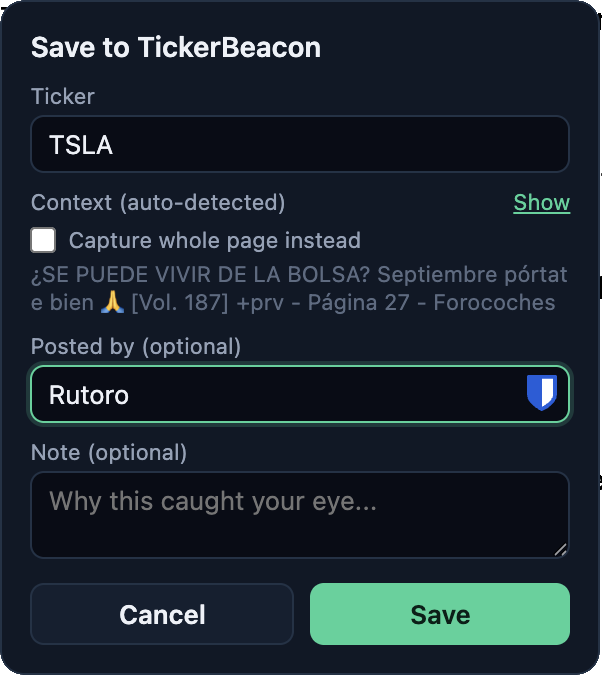
Select a ticker or the passage around it on any page and click once. The save writes to local storage first and then sync it — a dead connection or a slow forum never costs you a capture.
The popup auto-detects the poster and surrounding context, and leaves room for a quick note on why it caught your eye — both optional, neither slows down the capture.
Enriched automatically
A lightweight backend proxy pulls company facts from reputable sources — so every capture arrives with context you didn't have to go look up.
When saving the ticker, the context of the source is processed automatically and saved.
Sign in with your email and a 6‑digit code — no password to manage — and every capture syncs automatically across the web app, the browser extension, and your phone.

Thesis, synthesized automatically
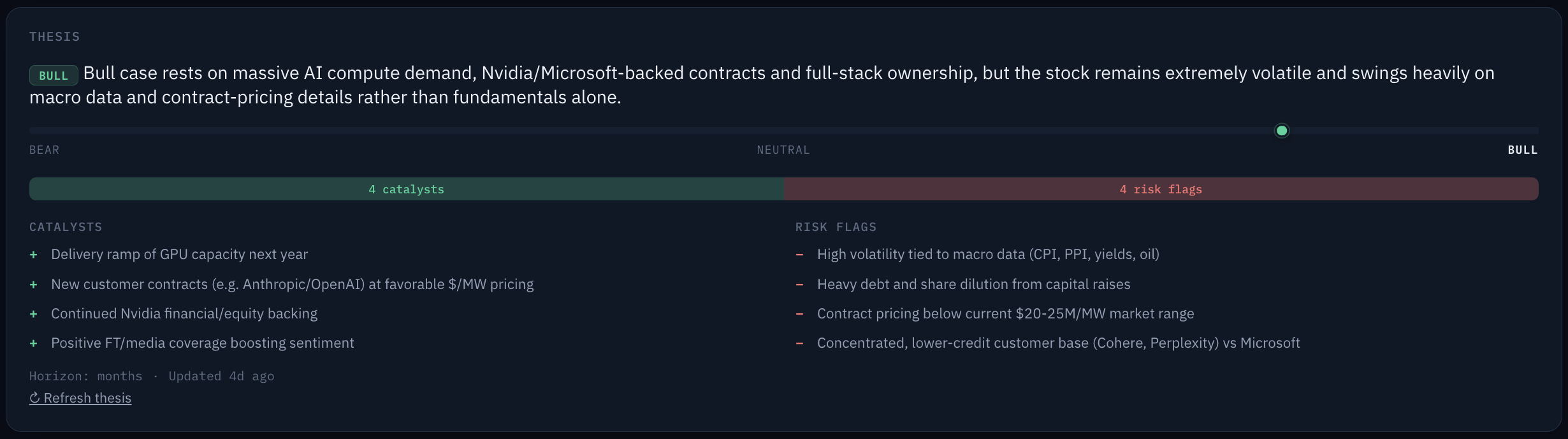
Ask once, an AI agent automatically reads every mention you've saved for that ticker — pulling out the bull case, the bear case, and what's changed since your first save. No rereading old passages required.
An assistant that reads everything you save
Every insight is generated after the capture and stored next to it, never inside it. The context around your highlighted text stays exactly as you left it; the AI's read on it is a separate, clearly labeled layer. Easily accepts both of them.
Every mention, read for you
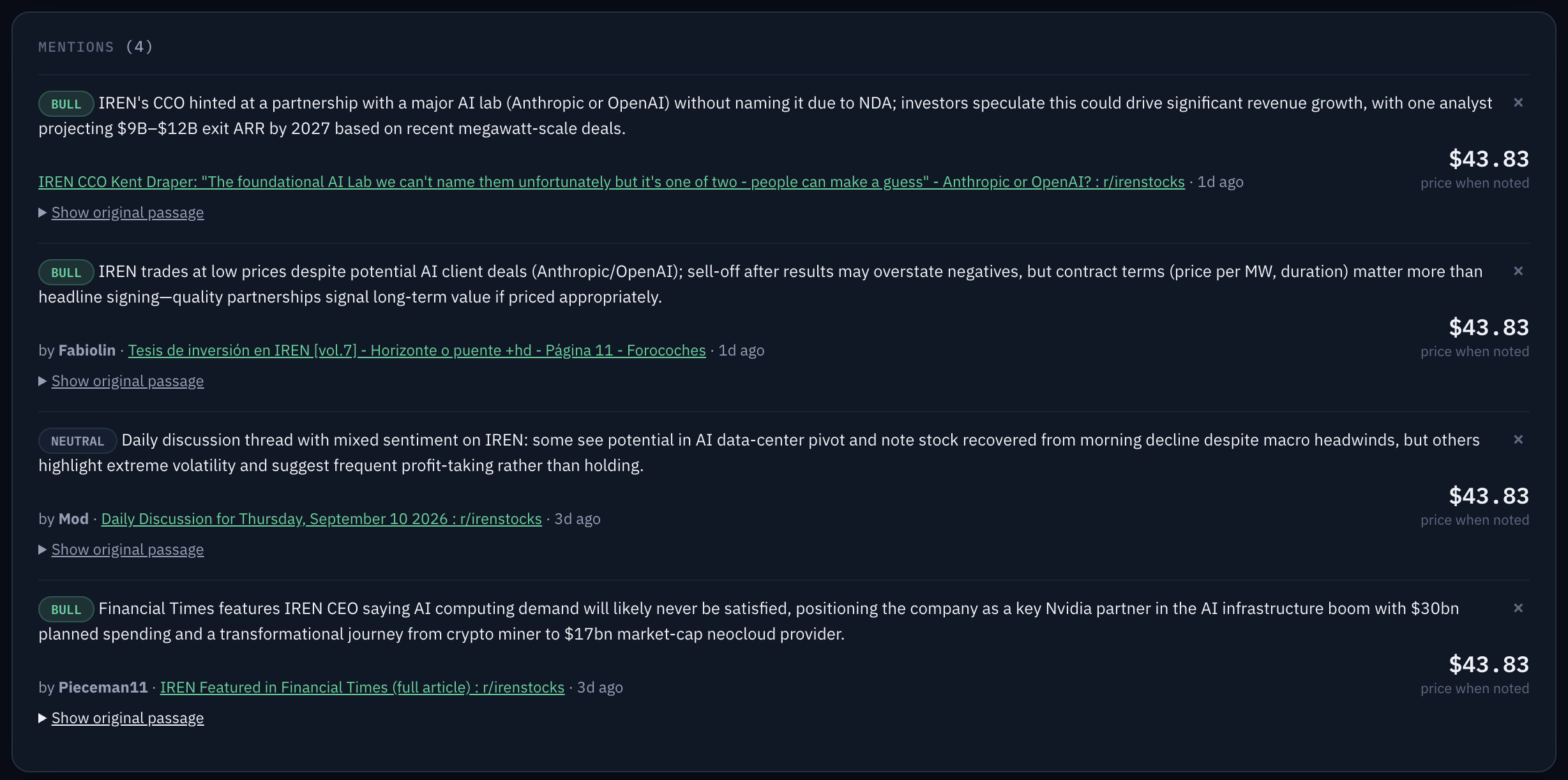
The moment a mention lands in your watchlist, the AI agent gives it a summary "why this was worth saving," a stance, any catalysts it mentions, a time horizon, and risk flags — so you don't have to reread the whole passage months later to remember the gist.
- One-line summary generated automatically, in the background
- Stance (bull / bear / neutral), catalysts, horizon, and risk flags
- Runs after the save completes — it never slows down or blocks a capture
Ask for the thesis, not just the log
Whenever you want it, an advanced agent reads every mention you've saved for a ticker and synthesizes the case as it stands across all of them — the bull points, the bear points, and what's changed since your first save. It's compiled from your own record on demand.
- Synthesizes across every mention, not just the latest one
- On-demand only — nothing runs unless you ask
- Labeled as AI output — it's commentary, never a rewrite of your notes
The full review dashboard, on the same account.
Everything the extension captures lands here — searchable, sortable, and organized well enough to actually revisit.
Every ticker you've caught, in one table
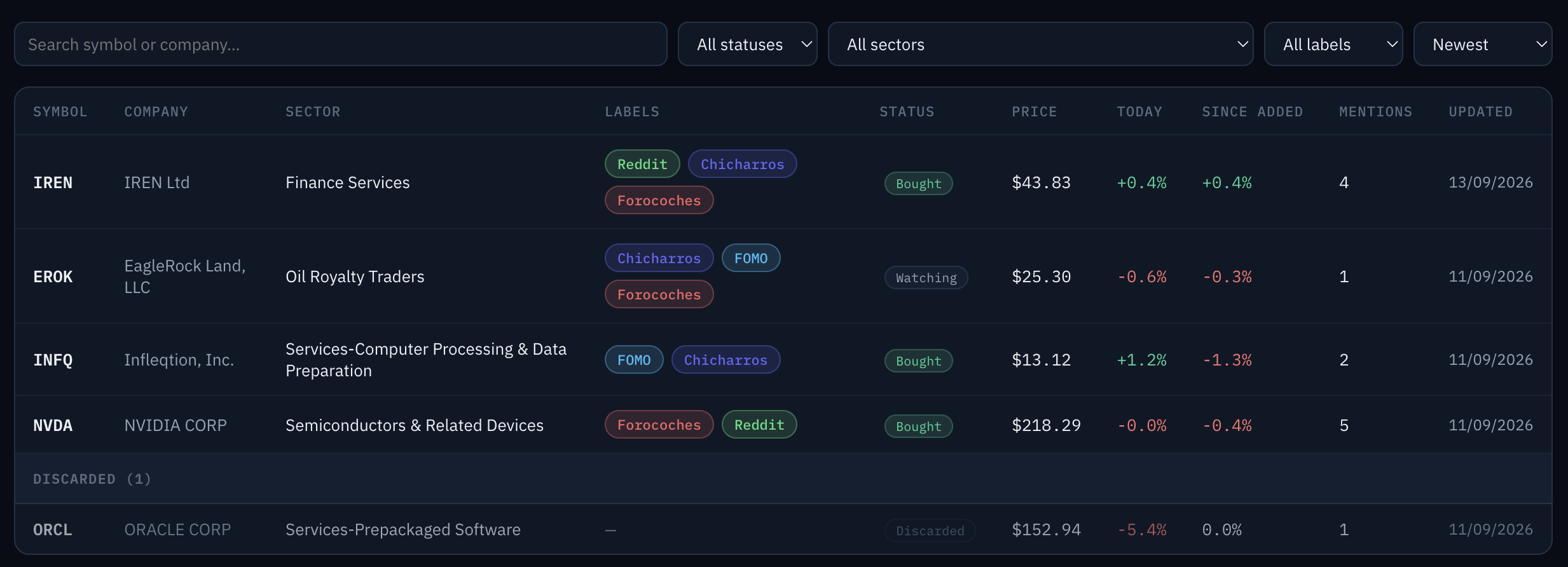
The watchlist is the home view: search by ticker or company, filter by category or exchange, sort by last price, change, or capture date.
- Full-text search across ticker and company name
- Filter by any combination of categories
- Sort any column, ascending or descending
The receipts, in order
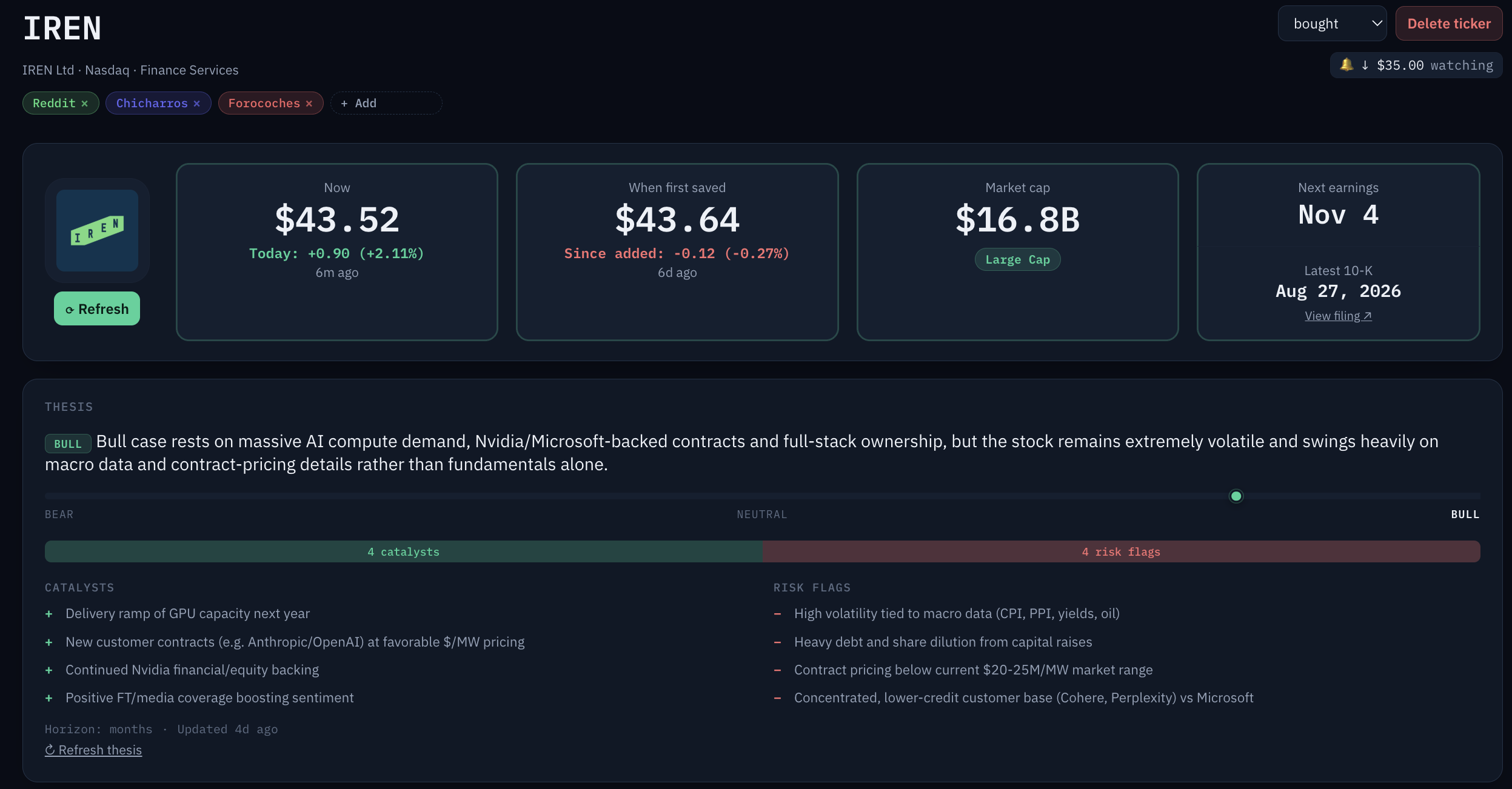
Open any ticker and see why you saved it — an append-only log of every mention with its source, the passage, the date, and the author, plus your own notes and a price-history chart from stored snapshots.
- Mentions are append-only — nothing gets quietly edited
- Private notes live alongside the mentions
- Price history builds from every refresh, automatically
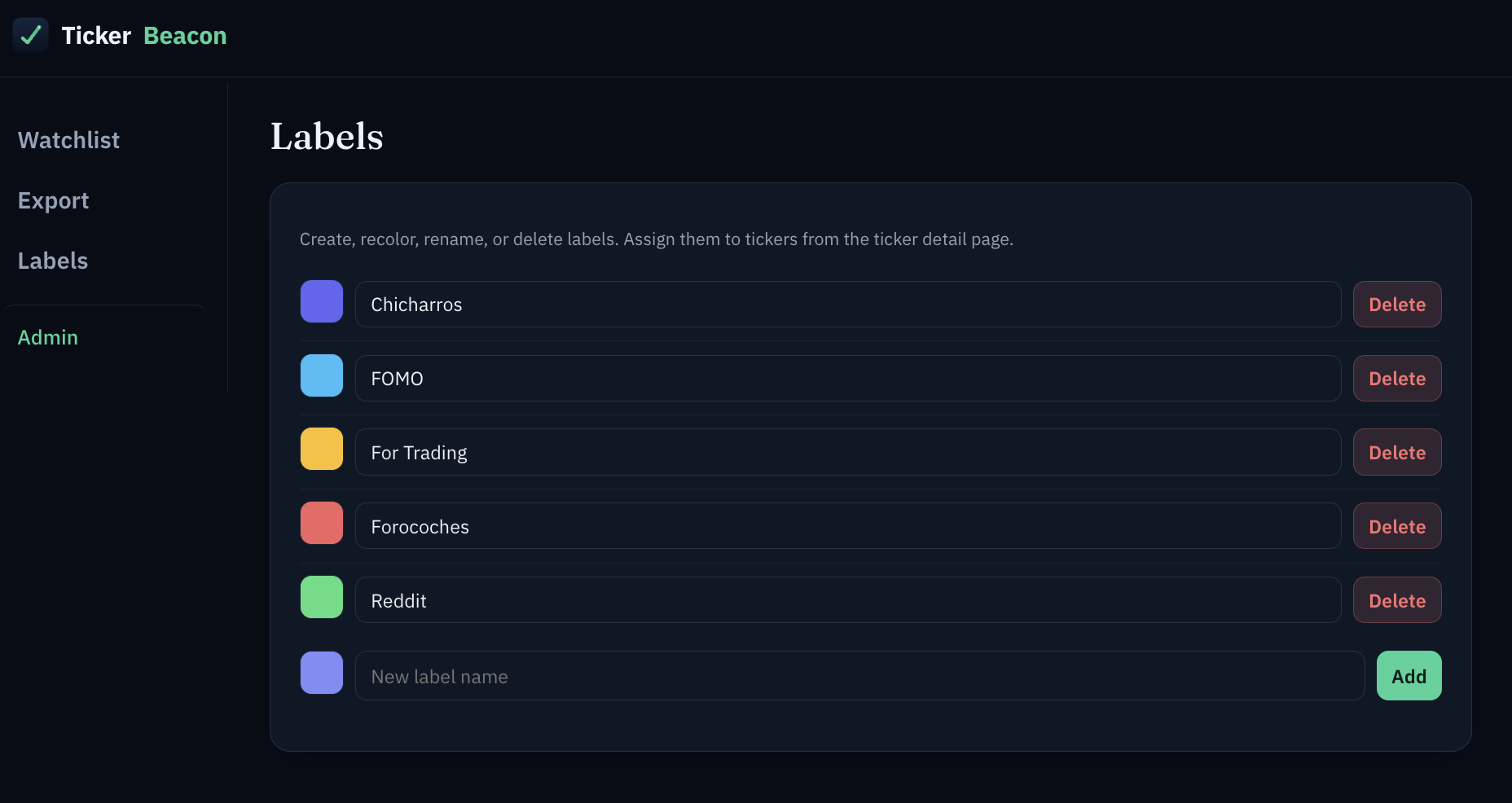
Tag it your way
Categories are many-to-many — a ticker can be "biotech" and "high conviction" at once — so you can filter your watchlist by whatever taxonomy actually matches how you think about it.
- Assign as many categories as make sense
- Filter the watchlist by one or several at once
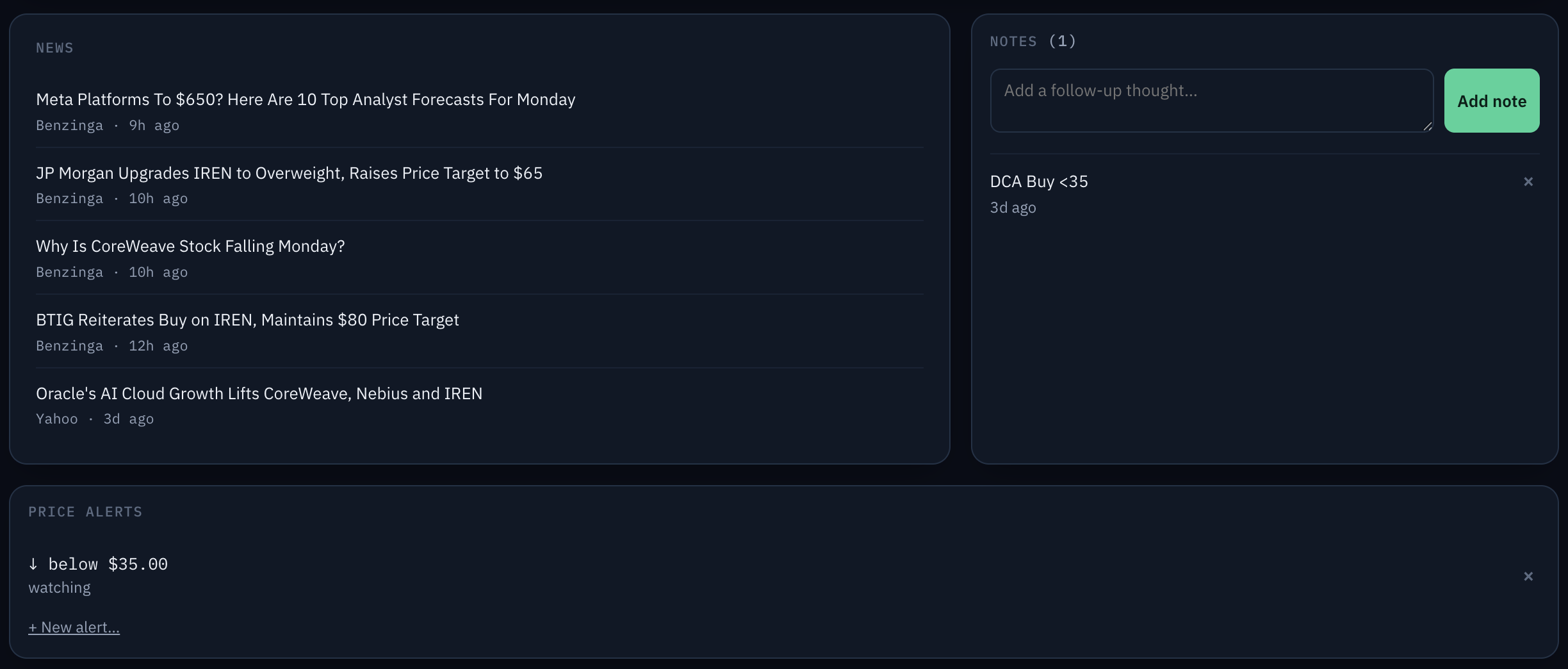
News, notes, and alerts, all on one ticker
Every ticker page pulls in recent headlines automatically, keeps a running log of your own follow-up notes, and watches for the price target you set. Cross it and a badge shows up in the extension popup, a banner shows up in the web app — checked opportunistically whenever a price refreshes, not by a background server watching the market for you.
- Headlines pulled in automatically from reputable sources
- Add follow-up notes any time, not just at the moment you save
- Set a price target, above or below — surfaces in both the popup and the dashboard
Portable in, clean out.
TickerBeacon is a place to keep records, not a place to trap them.
Export anytime
Pull your whole watchlist as JSON or CSV — tickers, mentions, notes, categories, and alerts included.
Import to migrate
Bring in a JSON or CSV file from a spreadsheet or a previous export and pick up where you left off.
Deleting cleans up after itself
Remove a ticker and its mentions, notes, and alerts go with it — nothing orphaned left behind.
Before you install it.
Is this financial advice?
No. TickerBeacon is a personal research and idea-tracking tool, not a brokerage and not a source of investment advice. It records what you read and what you thought at the time — including the AI-generated summaries and theses — so you can evaluate it yourself. Nothing in the product is a recommendation to buy or sell.
Is my data private?
Yes. Capture is fully manual — the extension never scans or scrapes pages in the background, it only saves what you explicitly select. Saves write to local storage first and work with no account at all; syncing to the web app is opt-in via email sign-in. Your original notes and passages are never altered by the AI features — AI output is generated and stored separately from what you actually captured.
Does it work on any site?
Yes — Reddit, forums, blogs, filings, social media, anywhere you can select text in a browser. The extension doesn't rely on site-specific integrations or scraping, so there's nothing to break when a site changes its layout.
Start catching tickers.
Install the extension for the capture, sign in with an email code for sync, and use the web app whenever you want the full picture.